
Data security and media handling
Pixop is a cloud-based video processing platform built on Amazon Web Services (AWS).
Pixop's video processing and storage services are hosted in the AWS Ireland region.
Video data is protected throughout the workflow, including while it is transferred, stored, processed, and downloaded.
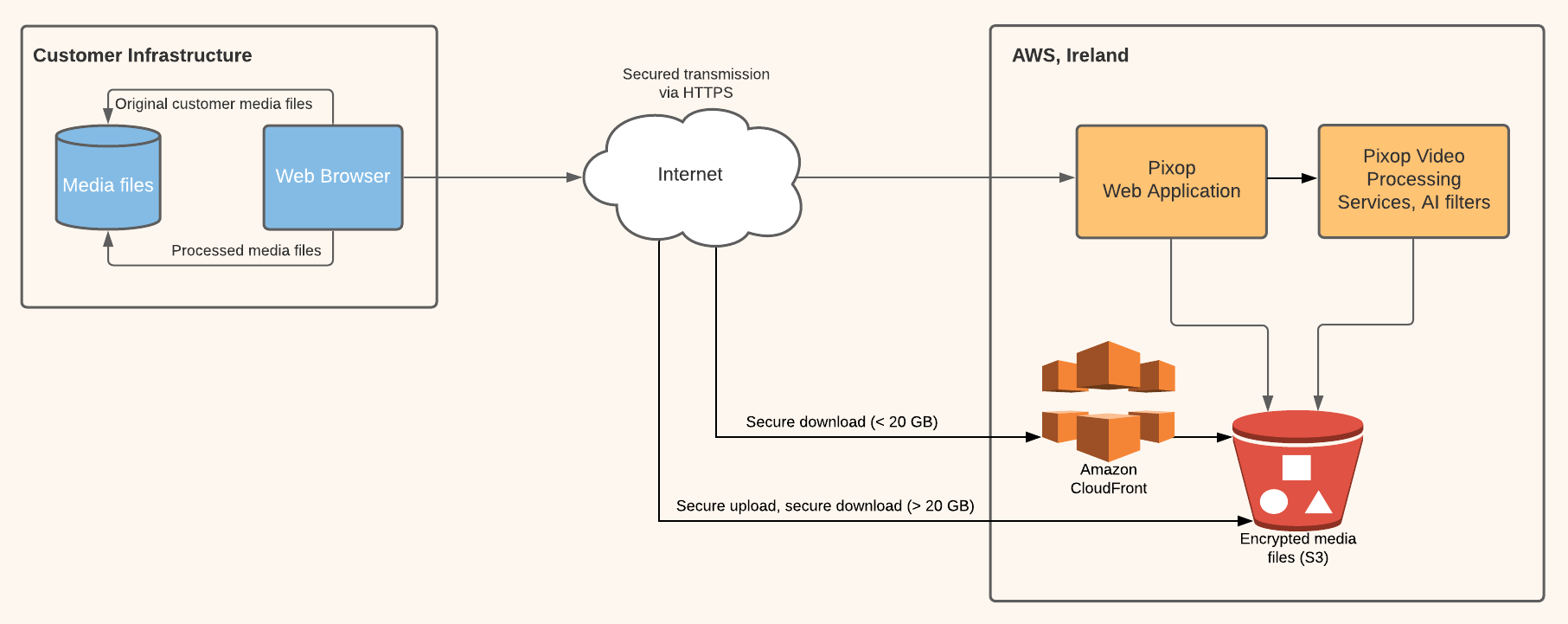
The illustration provides a simplified overview of how media moves between your computer, Pixop Studio, AWS storage, and the processing infrastructure.
Encryption
Video data is protected using encryption both in transit and at rest.
Media files stored by Pixop are kept in encrypted Amazon S3 storage.
Communication between your browser and AWS services, as well as communication within the processing infrastructure, is encrypted in transit.
Uploading video
When you upload a video through Pixop Studio, the application coordinates the upload and the media file is transferred directly to encrypted Amazon S3 storage.
The video does not need to pass through Pixop's web application servers before reaching media storage.
After the upload is complete, Pixop ingests the file and makes it available in Studio for inspection and processing.
Processing video
When you start a processing job, the required source media is retrieved from encrypted storage and processed using the configuration you selected.
When processing is complete, the resulting media is returned to encrypted storage and becomes available in Pixop Studio.
Downloading video
When you download a source or processed video, Pixop uses AWS infrastructure to securely deliver the file to your computer.
Download transfers are encrypted in transit.
See Pricing for information about download charges.
Access to your data
Access to customer media and account data is controlled through Pixop's application and infrastructure security controls.
Within Pixop Studio, all members of a team have administrator-level access to that team's projects, videos, presets, and settings.
Only invite users you trust to your team.
See Teams and account management for more information about team membership and permissions.
Data retention and deletion
Source videos, clips, and processed videos remain stored in Pixop until they are deleted.
For information about deleting a team and its associated data, see Teams and account management.
Need help?
If you have questions about data security or media handling, contact [email protected].
Updated 3 days ago